Full Guide
How to Automate Small-Business Work with Make: The Full Guide
This full guide combines current product facts with GrowthPilot's first-hand Make experience. It explains our twice-daily Sheets-to-AI social workflow, human approval boundary, visual diagnosis, credit planning and a controlled trial another small business can adapt.
Main Guide
What Make does in practical terms
Make calls an automated workflow a scenario. Modules receive data, search for records or perform actions; routes and filters decide what happens next. The visual canvas is valuable because it turns a hidden chain of integrations into an inspectable operating map. It does not decide whether the business rule is safe, who may access the data or what should happen after a failure.
A useful scenario begins with a defined event and ends with a verifiable business result. “When this approved row becomes ready, prepare a draft and ask its owner to review it” is testable. “Automate our marketing” is not. The smaller statement exposes the trigger, data, output, reviewer and stop condition.
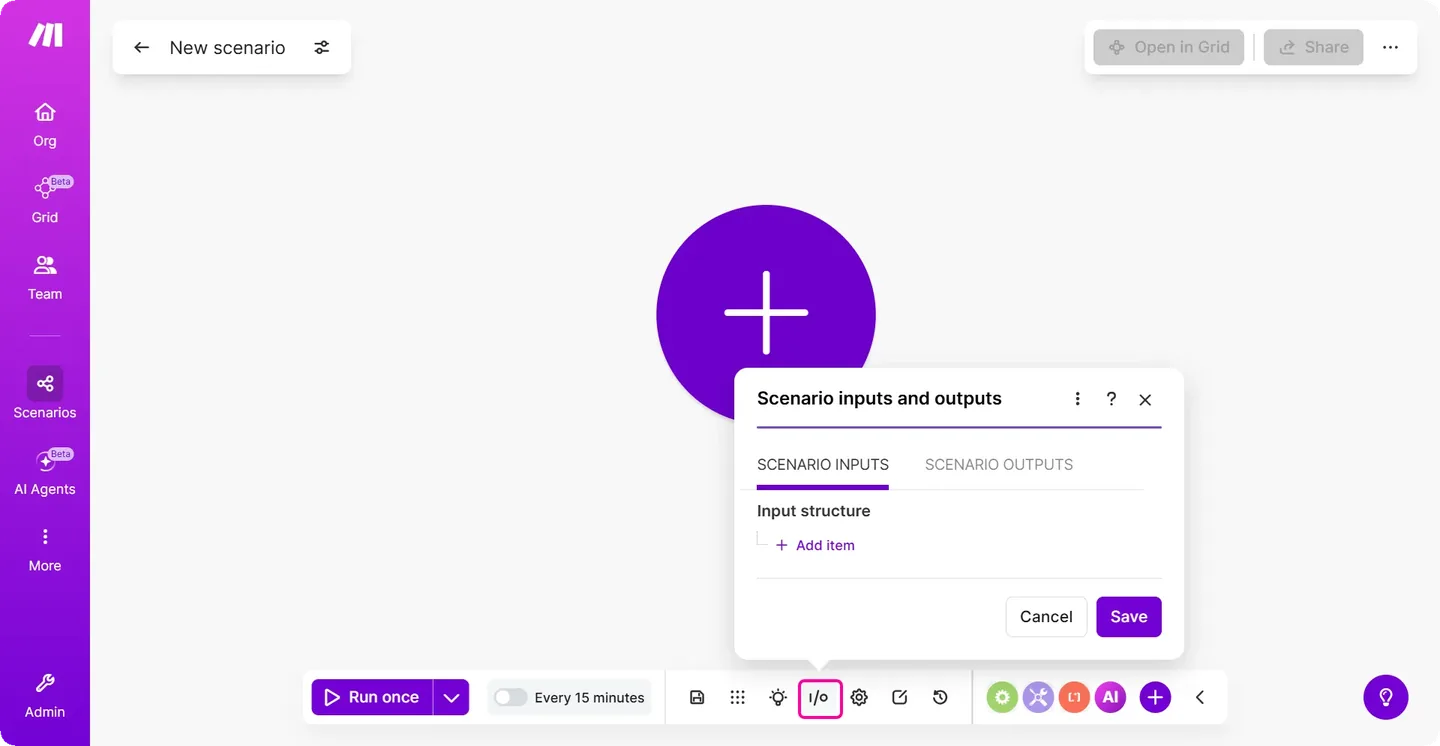
How we actually use Make
GrowthPilot uses Make as part of a twice-daily social publishing workflow. A Google Sheet holds approved topics and owned links. Make selects the next eligible row, sends the bounded material to Anthropic and OpenAI, receives generated social copy and routes it for human review. The workflow does not release the post merely because a model returned text: our operator reviews it, and only an approval lets Make continue to Facebook and Instagram.
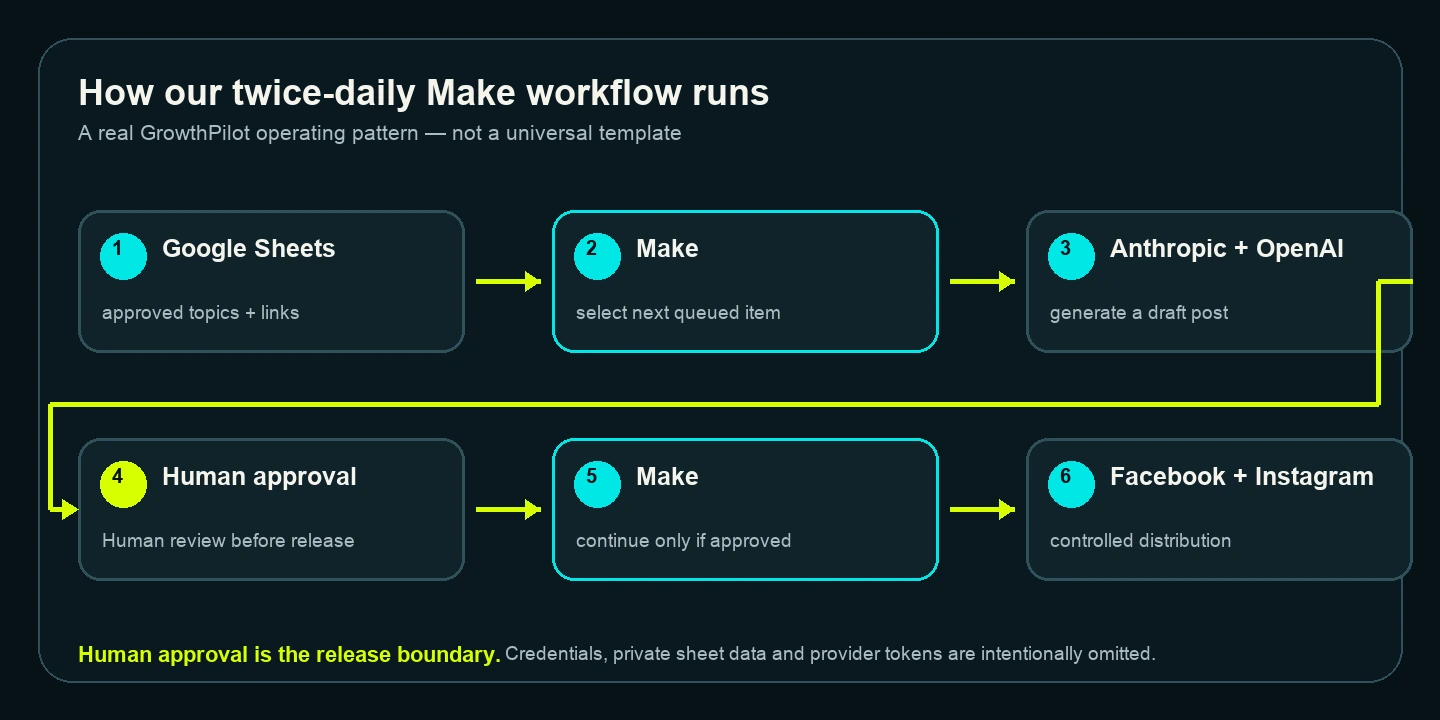
This arrangement matters for two reasons. First, content generation and distribution are separate steps. Second, human approval is a workflow boundary rather than an informal promise outside the automation. If approval is withheld, distribution should not happen. Other businesses can use the same principle without copying our tools or cadence.
What the visual builder feels like in use
In our use, Make has been approachable without conventional coding. The pictorial scenario makes the route through Sheets, model providers, approval and social destinations relatively easy to understand. When something fails, the canvas and run history usually help us locate the approximate module or hand-off to inspect. We can then adjust a mapping or condition and test again.
That is a first-hand observation, not a universal claim that Make is the easiest automation product. Complex routes can still become difficult to reason about. Connector behaviour can change. An apparently small scenario can carry broad account permissions or process many bundles. A visual interface reduces some implementation friction; it does not remove engineering or operational responsibility.
“Building a Make workflow feels a bit like completing a puzzle. You can get part of it working, test what happens, see where the gaps are and fill them in. The strongest result comes from repeatedly testing the whole route until the missing pieces have been dealt with.”
GrowthPilot team
Build with Maia: useful help, not automatic assurance
Make describes Maia as an AI and automation co-worker inside Scenario Builder. It can create or modify scenarios from prompts, explain a scenario and help troubleshoot errors. As reviewed on 17 August 2026, Maia is in closed beta for paid plans, with a four-week trial from signup on Free plans; message limits can change during beta.
That conversational route may make a first scenario more approachable for someone who has not traditionally coded. The operator still has to choose the right data, constrain permissions, verify mappings, handle exceptions, test failures and inspect the final business result. A scenario that Maia can build is not automatically a scenario the business should run.
Sheets as a simple queue
A spreadsheet can be a practical source for a bounded workflow because an operator can inspect the rows and understand what is waiting. The design still needs an explicit eligibility field, a stable item identity and a way to prevent duplicate handling. Avoid treating row order alone as durable workflow state.
- Give every item a unique, stable identifier.
- Separate drafted, approved, processed and failed states.
- Do not put API keys, access tokens or unnecessary personal data in the sheet.
- Record the remote result needed to reconcile an uncertain run.
- Limit who can change a row after approval.
For a more sensitive or high-volume process, a database or purpose-built queue may be more appropriate. The spreadsheet is useful because it matches our bounded workflow, not because spreadsheets are automatically safe queues.
Using more than one AI service
Make can pass approved material to more than one supported service, but each extra provider adds terms, permissions, failure modes and usage. Define why each service is present. Do not send confidential or personal information merely because a connector exists. Keep prompts, model outputs and final approval evidence proportionate to the risk of the task.
Our workflow uses Anthropic and OpenAI inside a controlled content process. This is not a recommendation that every social workflow needs two models. One provider, a template or no generative model may be more reliable for a simpler job. Use the Responsible AI decision to set information and review boundaries before connecting a model.
Put human approval at the consequential boundary
Approval belongs immediately before the consequential action. For our workflow, that action is social distribution. In another process it might be sending a customer message, changing a live record, issuing a refund or publishing a page. The approver needs the source, proposed output and enough context to reject it.
- Identify the exact action approval authorises.
- Bind approval to one immutable candidate, not a mutable document.
- Expire or invalidate approval when the candidate changes.
- Fail closed when the approval cannot be verified.
- Retain an evidence trail without exposing sensitive data.
For a first automation, a manual approval step outside Make may be adequate if it is reliable and recorded. The objective is controlled release, not maximal automation.
How we diagnose and iterate
We found it useful to inspect the route up to the first unexpected module, compare its input with its output, and test the smallest correction. That can reveal a missing sheet value, changed field mapping, rejected provider request or condition that routed the item incorrectly. We do not treat a green scenario status as proof that the business result was correct.
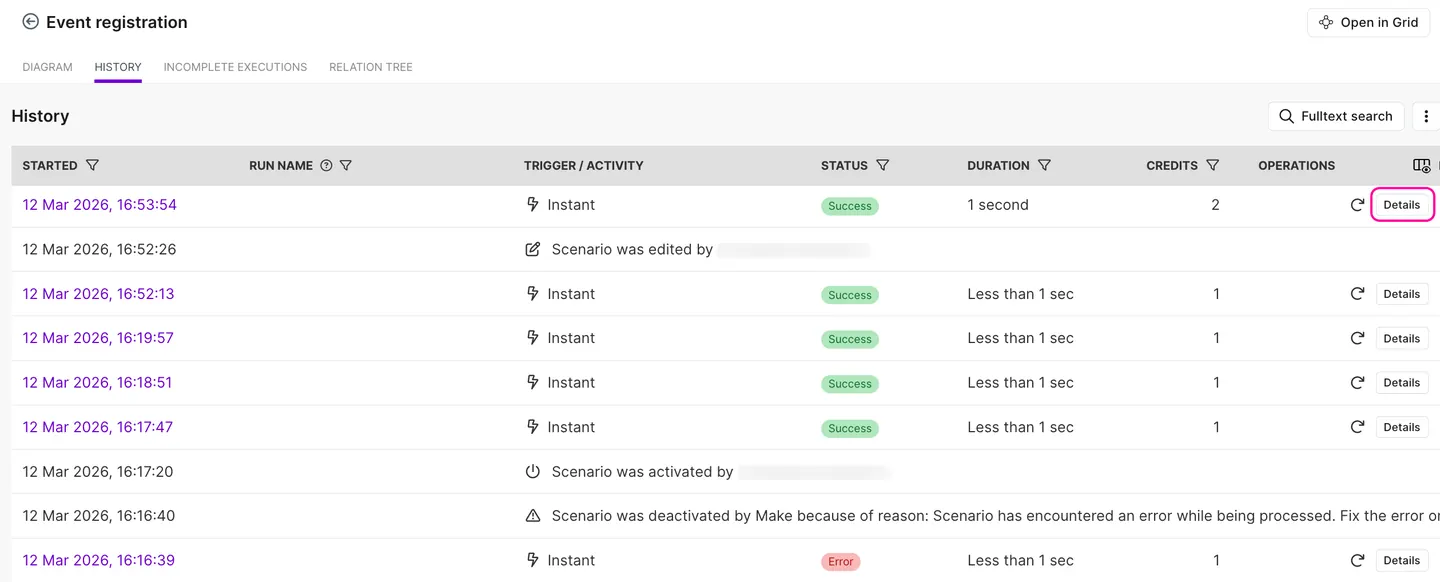
Define duplicate prevention and ambiguous-success handling before a live run. If Make times out after calling another service, do not automatically repeat the action unless you can prove the first request did not succeed. Reconcile remote state where possible.
Current credits and the price context
Current official surface: reviewed 17 August 2026, Make’s pricing page rendered Free at 1,000 credits a month and Core at $9 a month for 10,000 credits in the displayed billing context. The page offers monthly and annual selectors and says annual prepayment saves 15% or more. Selector, currency, tax and checkout can change the payable figure. Make’s help material says credits are the billing unit.
Current UK observation: GrowthPilot’s UK pricing view showed £10.59 per month for 10,000 credits and a 15% discount for annual payment. This is a dated observation of that official pricing context, not a promise of the final charge. VAT treatment, currency, billing selector, annualisation and promotions can change the final UK checkout figure, so confirm the total before purchase.
In plain English, a credit is broadly a unit Make consumes while doing work through a scenario. For many ordinary modules, one module operation uses one credit. If Step 1 reads a row, Step 2 sends data, Step 3 writes a record and Step 4 posts an approved result, one business outcome can require several credits. Do not assume one visible box always equals exactly one credit: searches can return bundles, later actions may repeat for each bundle, and some modules have different rules.
Make’s current documentation distinguishes fixed and dynamic usage. Non-AI apps normally use one credit per operation. Third-party AI connections such as our Anthropic and OpenAI connections normally use Make credits for operations while the AI provider charges for tokens. Make’s own AI provider and certain AI or advanced modules can use credits based on tokens, file size, pages, processing time or another stated rate. Routers, filters and some error-handling modules can be free. Estimate from representative runs, including searches, repeated bundles, failures and reprocessing, then compare the result with maintenance and manual work. The First 30 Days guide provides a useful evidence window.
Security, data and connected accounts
List every field that crosses the scenario and remove information the receiving service does not need. Use the narrowest available account permissions, protect connection ownership and document what happens when an employee leaves. Make publishes security and compliance information, but provider controls do not replace the business’s lawful basis, access decisions, supplier review or recovery plan.
When Make may be unnecessary
A native integration is often preferable when it performs the exact task with adequate review and recovery. A checklist or scheduled manual action may be better when volume is low. A process should be redesigned before automation when its rules are inconsistent, exceptions dominate or nobody owns the source data.
Compare Make with n8n or Zapier only after defining the same workflow and operating constraints. The automation tools comparison covers those operating models, while the n8n guide explores the extra control and ownership that route can involve.
A controlled Make trial
- Name one repetitive task and its accountable owner.
- Record the current steps, volume and common exceptions.
- Define the trigger, permitted fields and intended result.
- Choose a reversible output such as a draft or internal notification.
- Confirm current module support and required permissions.
- Prepare non-sensitive success, failure and duplicate test records.
- Run on demand and inspect every mapping.
- Verify the result in the destination, not only in Make.
- Record credits, correction effort and failure recovery.
- Approve, revise or stop the trial with written reasons.
Conclusion
One reason we continued using Make is that its visual workflow gave us an understandable route through Sheets, AI generation, human approval and social distribution. The value came from a stable process and controlled release boundary, not from automating everything. Start smaller than you think, test failures as deliberately as success, and keep an accountable person able to stop the scenario.
Sources reviewed
- Make pricing, credits, operations, Maia, scenario, module, scheduling, history and error-handling documentation reviewed 17 August 2026.
- GrowthPilot operator evidence for the live Sheets → Make → Anthropic/OpenAI → human approval → Make → Facebook/Instagram workflow.
- Current UK pricing-view observation retained separately from the public USD pricing context and final checkout.
- GrowthPilot team’s first-hand puzzle analogy for iterative scenario building and testing.
Product features, plan limits and prices can change. Current vendor facts and first-hand experience are recorded as separate evidence classes. Affiliate relationships do not determine GrowthPilot’s editorial conclusions.
GrowthPilot may earn a commission from qualifying purchases through commercial links, at no additional cost to you. Commercial availability does not determine inclusion or assessment.